Sunday, May 24, 2015

postgresql Error || ssl.key || server.key || access denied || FIX || - level - Intermediate

Hi, I am Budhaditya, The tech fellow once more, And I am here to talk about some truly carriage issue on Kali Linux here. Its a moderate level post, so in the event that you don't know anything about Linux/CLI/Kali, I would propose to pull out, as you won't comprehend a thing.
|
Its about Postgresql. Postgresql is an open source DBMS which is utilized as a part of Kali linux to keep up its database. Recently I had a hopeless night altering a sudden issue with postgresql startup. It said that it is having issues with getting authentication to server and ssl keys. I never had this issue nor I am myself a genius to see every one of these things. So discovered each web journals, discussions and so on however discovered nothing straight forward and helpful except for got a thought regarding what to do. Its a basic issue on evolving authorizations.
|
Databases and SSL manages encoded private keys, which I don't know much about, however I will say, that, as it is private, they doesn't permit everybody to utilize it. the Root client, or the Postgresql Administrator will just have the privilege to utilize it. So the principle mystery is, you need to discover those keys and change the Permissions. Presently in Linux frameworks, there are various indexes, containing comparative documents which is elusive without great experience. Today was hellfire of an affair, so I am sharing it.
|
You need to go to filesystem -> var -> lib -> postgresql -> Version -> Main -> And here you will discover, Server.Key file. Change its consents to - Owner as postgresql administrator, and authorization to Read and Write,
Furthermore, for next step, go to and so forth -> SSL -> private -> change ssl-cert-snakeoil.key 's consent to again - proprietor as postgresql administrator and authorizations as Read and Write.
|
Tweek here is, other than proprietor account, Both Group and Other Account's authorizations must be set to NONE. At that point just postgresql will work.

In the wake of doing this, My postgresql is currently opening effectively once more.

THANK YOU

Wednesday, May 20, 2015

Computer Lab? || In a big room? || Or in a computer Itself?

 Introduction to Virtual Machines.


Hey, Its Budhaditya the Tech guy again, And I am here today to introduce you to something awesome here. Its every tech guy's dream to have multiple computers interconnected in a room, May be software testing, Different OS choices, Penetration testing etc. But what if you don't have funds like me?
|
Here I come to introduce you to Virtual Machines....
|
So What are they? They are emulated hardware platforms where you can install almost all existing operating systems without even paying a penny (Optional).
Two years ago, I wandered what Virtual Machines were? You know techie movies always have these names? For example, Untraceable, Hackers, Algorithm. etc. Now I am the one using 4 Virtual Machines at a time.
|
Some Names, - Oracle Virtual Box - Free, VMWare Workstation - Free Player and Payed Full version Workstation, Windows Virtual PC - Also free.
|
Requirements, -You Need 3 Main Things - Good Hard Drive Space, Great Processing Power, Intel - i5 - i7 Would be great, and a hell lot or RAM. Preferred 16 GB.
|
Another thing you must have is a Virtualization enabled CPU. You must enable it from Bios. It will be on bios as either VT-x (Intel) or AMD -V (AMD).
|
What I Personally use? - Oracle Virtual Box. Why? its Free.
|
How to set it up?
- Setting up any Virtual Host Platforms are pretty same. I will be showing today's example with Virtual Box.
Download link - Click Here
We need another addon called Virtual Box Extension for USB2/Intel PXE Rom/Guest Options etc - Talking about this later.
Extension Download Link - Click Here
|
Installation - Installation is pretty easy. Just run the Setup.exe and follow on screen instructions until successfully installed, And after The main package is done, Install the Extension pack, And now you are all set.
|
Creating and Installing a Virtual Machine. -
Download the OS Image file you wish to try/work/test. Or You can use bootable USB, Or just an old school CD/DVD. I Suggest using Image options for better speeds.
|
Follow The Images.

Open up Virtual Box, And Create NEW by clicking it.


In the Create New Virtual Machine Menu,
Name your VM,
and Select Kernel type and version
Select adequate amount of RAM,
based on OS requirements
Create a new Drive.
 There are other options for adding a drive manually later.
Choose VDI (default)
VDMK will also be compatible VMWare
Rest are rare and developing based.
I suggest to go with Dynamic Allocation,
Advantage on Dynamic over fixed is, After you setup a specific disk space, Dynamic Allocation will limit the drive to that space, but will fill up as per Data usage unlike Fixed. Fixed will just cut off a specific size from the HDD, which is not very economical.
Set the dynamically or fixed allocated disk space,
according to OS requirements.
After you click the last "create" button,
Your VM is now ready to be setup.
Click and go to the newly created VM's properties, and setup according to following images.
Until you want to leave your VMs completely unattached with host,
Enable these. Shared clipboard means, You can copy paste from host to guest or vice - versa
And Drag'n drop means, you can transfer files with simple Drag and Drop.
Leave rest options as default.
Boot Order is pretty important, As you need CD/DVD to boot your VM up
RAM adjustment can also be done here.
On to the next tab, is the Processor.
Leave execution cap as default. 
Now, If you have multi core CPU, and if you are going to do heavy CPU consuming jobs on VM, I suggest to increase Core count. 2 cores for Windows 7 is okay. 
Very Important - Enable PAE/NX. 
PAE lets to Above 4 GB usage of RAM on 32 Bit Operating Systems.
NX protects RAM From Random execution of Malicious Codes.
Some OSes need it, Some Don't. If OS Boots up without PAE/NX then no need to enable it.
If you are gonna use GUI VMs and t do basic Graphical jobs, I suggest to enable 3D Acceleration and Giving the full video memory. If you want to use multiple monitors, Just increment the monitor count.
This Part is important.
Networking - NAT means Network Address Translation which breaks down one IP Address to several internal IP Addresses to be used by multiple terminals. VirtualBox has NAT Built in.
Bridged will be another main option, Bridged will make your VM another machine on your Router.
So before you select Networking modes, Know what you want to do.
And You can also use multiple adapters, and can use both NAT and Bridged.
Others are Host Only, Internal NAT, etc. which are not for Web Connections.
In this Shared folders stage, You can define a specific folder/drive to be used as network drive from VM. You can check read only, So you can just read/ and copy files from Shared drive to VM, But in unchecked mode, You can read/write the drive. And Checking Auto-mount will automatically mount the drive for VM use.
After you are done with settings, Start your VM and it will wait for Disk. Select Real DVD/CD or virtual image drive. And after that. You are ready for as usual OS installation like as it would have been in a real host machine.


After Installation - After installation, Mount Guest Additions Disk from devices tab and install required drivers including Guest. Its easy on Windows systems, And if you want the same in linux,
This is the link to another of my blog posts about just "Installing Guest Additions on Linux"
Link - Click Here

Conclusion - Until your computer is Super fast, Do not expect to get smooth Virtual Experience. Virtual Machines will not be as fast as host, Host will be slowed down, Processor will be at peak, But you got your own lab right in your PC. 
|
This tutorial was a request from a fellow friend RKZ. 

THANK YOU


Wednesday, April 29, 2015

ASUS Chrome Box Review | Failed to impress

Well Hello! I am Budhaditya the Tech Guy, And I am here to demonstrate briefly about the new revolutionary Asus Chrome Box, and state my reasons on why it failed to impress me.

Well, You might say I am a complete moron to tell this product not good, but I will give you my reasons,
But first, I am gonna give whats good about it.
Well, just looking at it, anybody can say that this is small. In reality, It will just fit on your palms, Its light, and it still contains a whole nearly desktop level hardware. It contains a 16 GB SSD which means it runs crazy fast, CPU varies on different products on different prices, that is, it has celeron, i3, and i7 processors. And the price ascends respectively. DDR3 Memory from 2 - 4 GB with 2 DIMM Slots. Intel HD Graphics of 4000 or 4400, with a power requirement of  65 Watts which will be available from the adapter supplied from the vendor. And the OS - It runs on Chrome OS. 
All USBs are USB 3 And what is more interesting is, it has passive cooling, means no fans, And it doesn't heats up also.


Now It is cool with a user who would just surf the internet, write some documents, take it to office for presentations, But coming on a little higher level, that is a hot blooded home user, Chromebox doesn't suffice.
The main problem with this device, that it holds a middle position of both a portable and a non portable device. Which means you can use some of it's features as both, Some of aspects not.
As I said, It also has an i7 varient, which means its a both costly and performance device, But in another hand it has an OS which is very limited.
For 1 brief review, Its like using a very costly, advanced, performer android phone which doesn't have a touch interface, Doesn't have a battery, a display, and in one word, Un-usable at complete portability conditions. On another side, It has a desktop like setup, where there is a lite Operating System installed i.e Chrome OS, which is based on linux but is mainly a web application system. Very Light. Also feels like running blue stacks or Virtual Android Machine on a very hi-def PC.
Now whats the use of using a Lite Chrome OS on an i7 Architecture? Is not this an over kill? Plus You basically can't do anything except than word processing, surfing, youtube and all. Android store, Android Apps not supported (TILL NOW) , Windows Applications Not Supported (TILL NOW) , No external devices can be installed, Specially the once with driver packs, because Drivers cannot be installed, Which also means you can't connect an advanced USB WiFi adapter to it. (It has wifi, But an adapter is needed for a few things). Only option is chrome store, Which is still new, and not very versatile. 

Everything I just said is for a regular computer lover user. For geeks, Nothing is impossible. Chorme OS will support android Apps soon. With Developer mode, Complete OS Change, Running Pure Linux, Installing Drivers, and Almost everything possible with a desktop PC is possible. But it wont be a typical ChromeBox any more. ChromeBox is very very limited.

Final Comments : If you are yourself a super lite user, who can work with a lite web based system, Chromebox is Good,
If you are a computer lover but not a geek, who bought this by its looks, performance, portability and a different OS experience, You will find this device super boring.
And If you are a geek, Who can alter ChromeBox to a Pandora's Box, Its also a good go.
But, as I said, Of you are looking for a review on "How CHROMEBOX is? I wanna Use it." I would just say - Boring.

THANK YOU

T

Sunday, December 21, 2014

Tech Talk Today - Phones

Hi guys, I am back after many days, and came back with some tech talk and news about phones.

Well First to say, This year, iPhone 6 and iPhone 6 plus came out, and like every time, we techies do not seem to care. Its really a question to me how iPhone is top searched tech device globally (According to Google Search Statistics 2014). Because even non techies and regular Joe can understand Android. Not deeply enough, but to work with, Android is fine enough. Android is of course open source, Can be debugged by user, And many things, but a regular Joe doesn't needs to know all these. Android is pretty easy. But Still iPhone holds both Market value and top searched device. Us Indians are quite responsible for this disaster. How? Because, In our country, iPhone is not a symbol of simplicity or anything. Its just a status. The one who owns an iPhone indirectly tells people "Look, I have an iPhone, which means, I can afford it". To them, Android is cheap, so they won't buy, but they don't realize, that The phone's hardware is the main investment here. Android OS is by itself free. Anyways, If we stop speaking of
wannabes and rich douche-bags, Another reason for apple's top form may be, as follows,

1)Android versions changed and got updated several times within the iPhone 5 - 6 came out.
So time for new ROMs, new Updates, New customizations,  and even new Phones. One Techie man buys minimum of 2 - 3 phones within the time iPhone versions change.

2)Android is for many many phone companies. iPhone is only one of its kind. Which means, if suppose 100 people wants to buy iPhone, He goes only for iPhone, But if 100 people want to go for Android, He/She have to choose between various phone companies namely Sony, HTC, Samsung, Micromax etc.

Conclusion - The number of Android OS users is the total number of android phone users. So if we do sum of them, iPhone statically wound't come to the list :)

Anyways, Lets leave talking of stuff techies already know of, Lets talk about some new phones I prefer Phone freaks should buy.

        First of all speaking of, - There are already great companies like Sony, HTC etc, But from India, We get Micromax from Gurgaon here with almost as same specifications of Branded imported phones in less than half of their price. But to be honest, as low is the price, is same as low build quality. Micromax serves as the device for all bellow average, average, and fair money income society, thats why Micromax has to degrade some of its quality. For visual problems, The Camera quality, Sound quality, Sound recording quality, Display quality is not given as promised. But when it comes to Hardware, CPU and SoC, Micromax is not under high priced phones.
To me, Micromax is not the phone to serve personal purposes. Its not highly reliable like Sony or HTC. But as I said, this blog is mainly for Techies, So Who cares, Micromax serves for Developers and testers, who likes to play around with ROMs, Recoveries, Partitions, and pure technical stuff. Who needs a good camera to install new ROM? LoL . Jokes apart, Another phone brand came in mind called "XIAOMI", so called the device of all humanity, Low priced and hi def hardware. Later we all came to know that It was pre installed with backdoors, and Many configuration problems, where you have to stay with MIUI ROM, and with viruses. DONT BUY EVER. Anyways,
 
      Micromax spoke of a new phone yesterday, which is yet to be released, named as Yureka.
Owners of Micromax confirmed some days ago, that this new Yu series will be the device specially targeted for developers. They said, that they will provide warranty even after rooting and customizing device. And for Hardware, The phone is packing a BEAST, - Qualcomm 615 SoC. And default ROM from Cyanogen - Cyanogen 11 with just the price of 8,999/- INR. Which will be exclusively sold on Amazon.

THE MICROMAX YUREKA

So for SoC, It packs with a Qualcomm Snapdragon 8 cored 64 Bit CPU clocked at 1.5 GHz, 2GB of DDR3 RAM, Adreno 405 Graphics Processor, 4G LTE modem.


Next it offers Android 4.4.4 Kitkat within Cyanogen 11 OS, which is optimized for greater battery backup, security and reliability. Micromax promises Android updates in the future.


For other features, Lets talk about Camera. Now I am not fond of Micromax Camera, but What? this time they are offering Sony's CMOS sensor. My favourite brand of all time. Yu is equipped with a 13 Mega Pixel Primary camera, with Sony CMOS Sensor, and 24 FPS full. And a 5 Megapixels camera at front.


Moreover it has an IPS display of 5.5 Inch with a resolution of 720 x 1280, with 267 PPI protected with Corning Gorilla Glass 3.

To note, that to power all of those beast, the power source is not enough. It only packs with 2500 mAH. Where imported phone specifications of even nearer to this phone, packs with 3K + mAH. But as said, Developers, from when did they need great talktimes? LOL.

A very important point for developers, It has an internal memory of 16 GB, where 12 GB is free for internal apps. And rest upto the hands of developers.

So, To me, This is a great phone for developers, and both Personal use to a little extent, with a good build quality too. If I get some money this year, I am going for this phone genuinely.

The final image -

Thank you

Good bye


Monday, July 28, 2014

Social Security Awareness : How are you possibly get hacked?

YOU ARE BEING HACKED!


So? What up viewers? I am Budhaditya here again with some discussion about social security awareness. Today I will discuss about how newbie and less experienced internet users, or even the experienced ones, get "Hacked" . You guys are important to me, So I felt to write some lines about how can you possibly protect yourself from loosing your personal information, your Bank accounts, your Facebook, Gmail, Twitter accounts. And how you are possibly get trapped.

So lets start about newbies a bit. :- When someone gets internet first, everything comes with the white RJ45 Cable or the wifi tower is the universe. That writing on a white page called G O O G L E is everything you ever wanted. Now before getting internet connection, every one has a a mega list about how and what to download. And Whenever you get the connection, its like "what the hell I thought about?" Any ways. Lets say the first you write is "google chrome free download" And as soon as you hit the enter button, you are listed with a big number of links to download it. For the truth let me say, the first 5 links may have nothing harmful, because they are most probably hosted by very legitimate websites. Now after 5 or 6 links? you may get stuff like : "Ultra Speed Google Chrome Available for Free download, /or a crossed 30$ as free, available for download for today only. 100% discount" You hopefully go for that, download a 456 KB, or even 15 or 100 MB of file instead of just 26 MB, double click it, May a google chrome installer really opens OR the file just vanishes from the desktop? You know you are dead man. Now you see a series of hangs and crashes, Your friends tell that its a virus and you have to format? you do it and never download chrome from that link, or go for modded Chromes again. What you gained here is a little bit of experience. Now what was that? This is called "SOCIAL ENGINEERING" The uploader knew that newbies like you will open it. Now what has the Hacker got and what can he do with it. 1st of all, He will make a permanent connection to your Computer, so no matter what, He gets a connection commenced automatically when you start your PC. In this case he will make his virus run at start up. Now as he is secured of his connection, he will try to make sure that you are not trying or installing any security measure to detect whats wrong with Victim's PC. Now he is kind of an owner of your PC. He can make guest account enable, grab or change your OS Login passwords, Make a new account for himself, Transfer files, Steal every single data you have in your PC. And the most important is, he can even use your computer to hack other big things, so he is not in the process directly. So the security would have a hard time finding him. This activity is called "PIVOTING" . He can also use it for "DDoS" i.e "Distributed Denial of Service" attacks. So you guys got a Hint right? about what these people can do?

Lets state some examples now to demonstrate how you are trapped every time.

Suppose, for the most common one, you simply type on google, "abcd.mp3 free download" you will find many links as well. Any links will have many fake download buttons now a days. One will be genuine or even not one. You will/or already have seen, that, when you click the "Download Now" button, They redirect you to a page where you have to download a downloader first to download the song. Who knows if that page doesn't have a Virus? Also, these adverts may have browser hacks, which will lead all of your browser data to be stolen by Hacker.

Again,  you see a video on Facebook stating, "The cancer you may already have", you click the link, either you are being re directed to a downloader, or an advert, or a "fake facebook page" (Talking about this later), wanting you to log in. And the most common, as soon as you open that video, you will see a confirmation box for saving the video file. Majority of the users will download the file, and Boom. you are down. Actually what happens is, majority of people have "show file extensions" feature turned off, so if you see the video as ABCD.mp4 ? its actual form is ABCD.mp4.exe that mp4 is just a decoy. So I prefer not to even go to that page which states "The cancer you may already have" until shared by a science alert or a medical page.

Phishing - One of the oldest techniques and the most foolish techniques. I am here to aware you how can you avoid this simple foolishness just by staying aware. Either your friend will send you a link like - 223.223.xxx.xxx and say new facebook for 2015 Theme preview. You went there, logged in, Kaboom. your username and password is in Hacker's hand. More professional and efficient hackers can even make a domain to hack you. They may send you an email from and like - security.facebook.com - your password is way too vulnerable, So we advice you to change your password now. you went there, entered login credentials, Kaboom. In this case, I advice you to give wrong information first in the suspicious link. because the phishing page have nothing to do with your right or wrong info. If the page goes back to the same login section, or displays "Page not available", then you will know thats a phishing page. If it states wrong username/password. Then you are sure its a real page.

Another big and the most popular Hacking mechanism is Pirated GAMES and SOFTWARES. Saying as me myself a gamer, I may trust big Game uploaders, But there are uploaders too who inject backdoors into the exe file of a Game or a software. This is a kind of illusion, where gamers are bound to execute the Virus. And Kaboom.

Self Defense : I always prefer to have an original copy of Internet security software like Kaspersky, Quickheal to detect viruses. Though advanced Backdoor Mechanisms will simply bypass the Security. In this context I will advice you to install Firewalls. I will advice everyone here to study about ports and what services they normally Run. When you scan yourself, Any Suspicious port you see open? TERMINATE. When a virus gets executed, it opens a doorway ie. port for hackers to come in. I will also advice to install a very efficient free tool called Malwarebytes Anti malware, which is actually very capable of catching malwares and viruses which Anti Viruses can't detect. Bitcoin Miner is one example of Malwarebytes detection.

So these are some easy steps for anyone who sits on computers and want to be free when surfing the internet. I felt to post this because, Being a Computer geek, sitting all day long, Loving her like hell, I still don't trust her. So I thought of this Awareness post.....

Thank you for bearing with me and reading this. Highly Obliged.

 THANK YOU

Tuesday, July 22, 2014

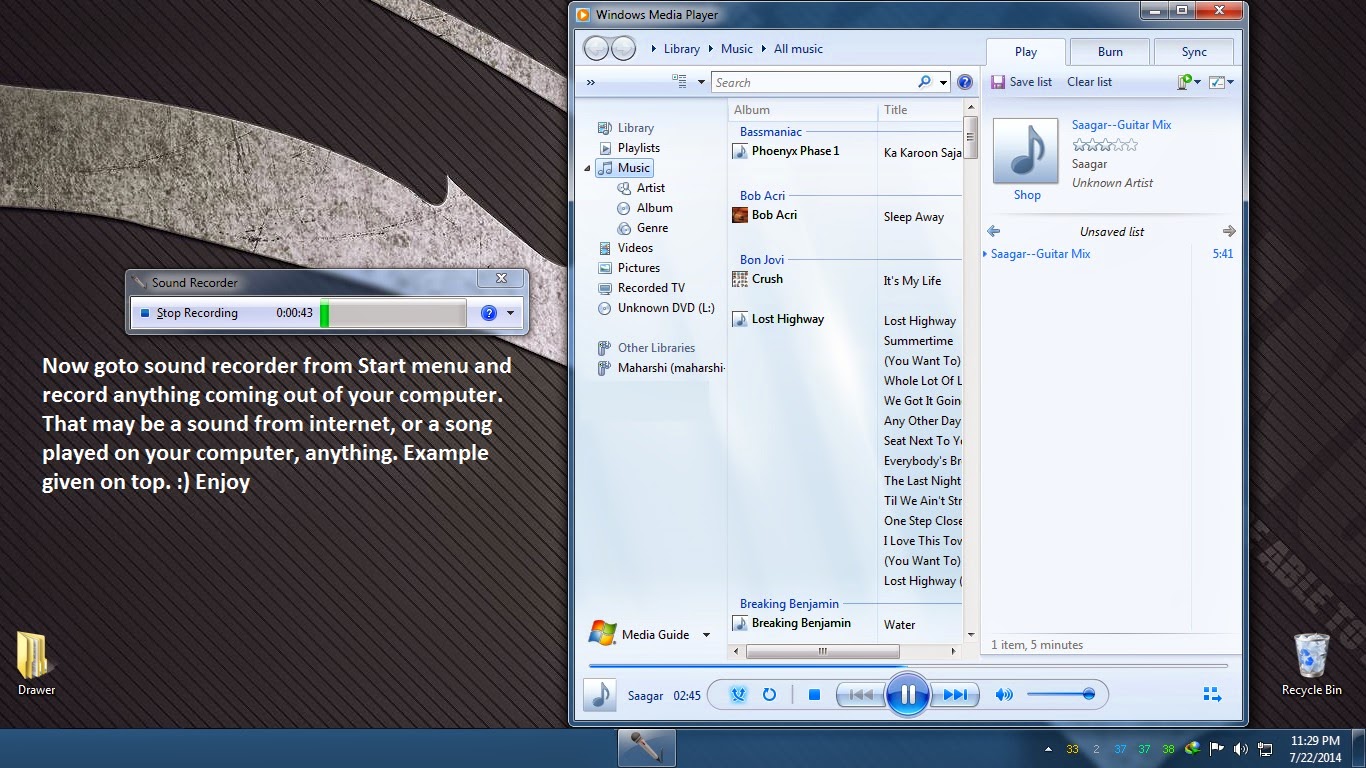
Recording sounds of off The Internet, Computer, anywhere with Windows Default Sound Recorder.....

Hi People :D .There are lots of software available on the Internet to record sound of off the Internet, Computer, and anywhere coming out of the computer speakers without holding a mobile phone in front of speakers :D LoLxD . But why download them, see tutorials, use options when there are easy steps just in your computer by default? So lets cut to the point. There is a little tweak we have to do in the sound recording devices available in Windows as default. I have made screen shots in Which I described it all. Here it goes.

:-


  This is how, the simplest in-computer sound recording can be done.

Request of this was made my bro Arya.

THANK YOU

Wednesday, July 9, 2014

What an MiTM attack actually is? - Detailed


MiTM is an Synonym for Man in The Middle. This a Hacking technology for a long time network flaw which still now haven't been patched up. This is a technology, where the Hacker poisons the whole network for grabbing usernames and passwords for any Login Form sites, Injects malicious code, Does phishing.etc. So you can see that This is a very powerful attack where may be even passwords of a social networking site to bank account passwords or very hi-level intelligence information can be gained. 'Please Note', that in this Information of today, I will not be explaining any guide on doing an MiTM attack. This is just a knowledgeable post about what MiTM actually is.

Okay, We will first illustrate this in real world hacking. Let us assume that we have 3 persons. A, B and C. A is a very rich man, or your enemy :p , B is a Life insurance agent, or a Bank agent who carries a lot of A's money. And C, thats you, is trying to ROB important documents and money of A. Now lets assume you have already done trying with Robbing his house, But A's Security is very high, The guards kick you out as soon you went infront of the house. Now what? Think what you dressed up and disguise yourself exactly like A, go in, take the documents, Bank A/C and stuff, come in, make a Xerox of everything, Then Disguise as A and go to B and say that I am A came today to give you a documents. So You acted here as Man In the middle. You poisoned both of them with an illusion that all things are right, and you managed to steal his documents.

The exact same thing happens to computers in a Network. Let me first demonstrate what is an ARP or Address Resolution Protocol, what is an IP address and What is a MAC address. An Internet Protocol Address. IP is a logical address of your Digital Device which is connected to the internet. Any thing digitally connected to the internet has an unique IP address. This Protocol is the main purpose of packet delivery through internet to another computer connected to the internet any where in the world. MAC address is the synonym for Media Access Control. It is the physical existence or address of a connected terminal. This address is unique to every device which is hard coded into the hardware device. In this case, its a Network Interface Card - NIC, which lies in the motherboard, or can externally be placed. Ex - A netgear Ethernet card. Now What is ARP? ARP converts a logical IP to a Physical MAC address to transmit data in a TCP/IP system. For Example When I send a DOC to be printed in a network, This happens. My terminal sends a broadcast message like this " Who is IP xxx.xxx.xxx.201? Then Every terminal ignores but the Printer replies with Hey Server? I am the IP address with xxx.xxx.xxx.201. Then again the Server sends a Reverse ARP request asking is Who have the MAC Address with XX:XX:XX:XX:A2? Then Again the printer says, This is my MAC address. After all these confirmations, The signal is finally send to the printer to print the document. This is how ARP works. There is a diagram of the above said words.

Typical Topography of an ARP
Now I will show How this ARP is poisoned to grab Login informations of off a network.

For example, When you login into www.facebook.com, or mail.google.com or www.mylocalbank.com, You login into a GET login form which is sent from the Domain Server, then by many means, it comes to your router, and then your switch/gateway, and finally to you. When you give your username and password, and hit 'ENTER' , Then the POST form goes to the route, then to the Domain Server by many means again. Now As that Top example like Mr A, B, and C, Lets say A is the User, B is Facebook, and C is the attacker. What C does, is it poisons the ARP so that A that is user's terminal thinks that C the hacker is router B. And Router B thinks that C hacker is user A. So when A logs into Facebook, or any login forms, First, the packets are all transferred to C hacker, and the hacker interprets, and analyzes every data in clear text form, and resends the packets to the router again so that the original connection doesn't fail. Thus An attacker can gain all the informations and passwords of off a network. This is what a Man in The Middle attack is all about. Diagram bellow v
A Successful MiTM attack
  I am still researching about this Attack and the protocol. So I don't know much myself. Just felt to Share what I know.

Dedicated to a Bro of mine - Arya Sengupta.

THANK YOU.